Does iPhone 11 Support eSIM? Everything You Need to Know
Wondering if iPhone 11 supports eSIM? This guide covers iPhone 11 dual SIM features, setup, supported carriers, and the best travel eSIM options.

Wondering if iPhone 11 supports eSIM? This guide covers iPhone 11 dual SIM features, setup, supported carriers, and the best travel eSIM options.
If you're wondering “Does iPhone 11 support eSIM?”, the answer is a ‘yes’. Every model in the iPhone 11 lineup, including the iPhone 11, iPhone 11 Pro, and iPhone 11 Pro Max, comes with built-in support for eSIM. That means you can enjoy dual SIM features, easily switch between carriers, and stay connected while traveling without the hassle of physical SIM swaps.
In this guide, we’ll walk you through how iPhone 11 eSIM works, how to activate it, which carriers are supported, and why it’s such a helpful feature for anyone using their phone abroad. Whether you're planning a trip, managing two connections, or simply want more flexibility from your mobile plan, this article has everything you need to know about using a travel eSIM for iPhone 11 and why it's worth setting up.
Does iPhone 11 have eSIM?
Yes, it does. All iPhone 11 models come with an eSIM chip built in. iPhone 11 dual SIM functionality is available in all models, providing access to both a physical nano-SIM slot and a digital eSIM.
So if you're asking, does iPhone 11 support eSIM, the answer is not only yes, it was designed with dual SIM in mind. Whether you're adding a second SIM for work or using an international data plan while keeping your local number active, the iPhone 11 provides that flexibility.
iPhone 11 eSIM Compatibility Overview
One of the great things about the iPhone 11 eSIM is its widespread support. Apple’s eSIM technology is compatible with most major mobile networks worldwide, particularly in regions such as North America, Europe, Australia, and parts of Asia.
Since the launch of the iPhone XS and XR, Apple has steadily increased its support for eSIMs, and the iPhone 11 supports eSIM just as well. This makes it a smart choice if you're planning to travel or just want to future-proof your device. Newer iPhones in the U.S. have already transitioned to eSIM-only models, and many carriers are adopting this digital format globally.
If you're using an iPhone 11 today, you can take advantage of the eSIM capability and have two connections without needing to change your device.
iPhone 11 eSIM vs Physical SIM — Quick Comparison
If you are still not sure about eSIM, here is a quick comparison for the iPhone 11 lineup:
|
Feature |
iPhone 11 |
iPhone 11 Pro |
iPhone 11 Pro Max |
|
Nano-SIM support |
Yes |
Yes |
Yes |
|
eSIM support |
Yes |
Yes |
Yes |
|
iPhone 11 dual SIM capability |
Yes (eSIM + nano-SIM) |
Yes (eSIM + nano-SIM) |
Yes (eSIM + nano-SIM) |
|
Compatible with travel eSIMs |
Yes |
Yes |
Yes |
|
Works with Jetpac eSIM |
Yes |
Yes |
Yes |
All three models offer full support for both types of SIMs, so you don’t have to choose; you can use both at once if needed.
How to Set Up eSIM on iPhone 11
The iPhone 11 eSIM setup is very simple and easy. It only takes a few steps, and you’ll be able to activate eSIM on your iPhone 11 without needing to visit a carrier store if you're using a provider like Jetpac.
Step-by-Step: How to Activate eSIM on iPhone 11
Here is how you can activate an eSIM on your iPhone 11:
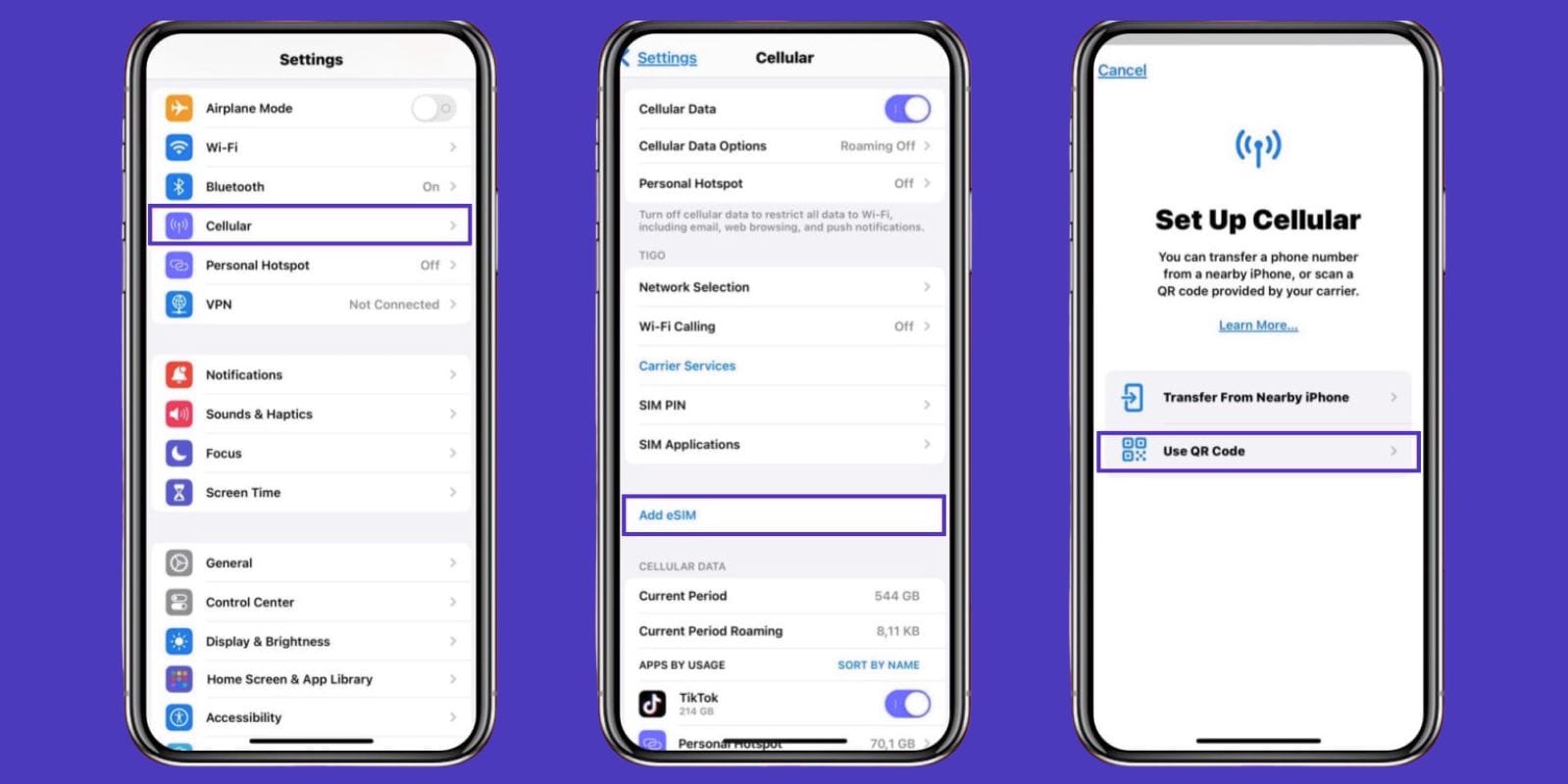
Open your iPhone’s Settings. Tap Cellular (or Mobile Data, depending on your region).
Select “Add eSIM.”
Choose how to activate:
Transfer From Nearby iPhone → If you already have an eSIM on another iPhone and your carrier supports Quick Transfer.
Use QR Code → If your carrier gave you a QR code
Scan the QR code from your eSIM provider. Your plan details will load automatically.
Label your plans. If you're using both a physical SIM and an eSIM, label them (e.g., “Work” and “Personal”) to keep things organized.
Tap “Continue” to activate. Once confirmed, your new plan is ready to go.
If you’re using Jetpac, you also have the option to set it up manually using the SM-DP+ address and activation code provided after purchase. That flexibility makes the Jetpac eSIM for iPhone 11 especially easy to activate, even without needing to scan a QR code.
Which Carriers Support eSIM on iPhone 11?
A wide range of global carriers support eSIM on iPhone 11. Some offer it via QR code, others allow app-based setup or carrier account login.
Supported Carriers Include:
|
Region |
Supported Carriers |
|
United States |
AT&T, Verizon, T-Mobile |
|
Canada |
Rogers, Bell, Telus |
|
United Kingdom |
Vodafone, O2, EE |
|
Europe |
Orange, SFR, Telekom, TIM |
|
Australia |
Telstra, Optus, Vodafone |
|
Asia |
NTT Docomo, Singtel, Globe, AIS |
|
Middle East |
STC, Etisalat, Zain |
Keep in mind: In mainland China, iPhone 11 eSIM is not supported. Those models ship with two physical SIM slots instead due to local regulations.
If you're planning to use a travel eSIM for iPhone 11, Jetpac is a great choice. It works in over 100 countries and offers instant activation, often without needing to deal with a carrier at all.
Benefits of Using eSIM on iPhone 11
If you haven’t tried using an eSIM yet, here are some benefits of using an eSIM on iPhone 11:
Use Two Numbers on One Device
You can keep your personal number on your nano-SIM while using a business line or local plan on your eSIM. This makes the iPhone 11 dual SIM feature super helpful.
No More SIM Card Swaps
With an eSIM, there’s no physical chip to insert or remove. Everything is digital, making it ideal for travelers who don’t want to carry multiple SIMs.
Seamless Travel Connectivity
Installing a travel eSIM for iPhone 11 before you fly means you’ll be online the moment you land. No kiosks, no paperwork.
Jetpac = Worry-Free Roaming
The Jetpac eSIM for iPhone 11 provides you with fast local data and zero roaming fees. You also get free access to WhatsApp, Google Maps, and Uber, even if your data runs out.
Troubleshooting iPhone 11 eSIM Issues
Running into problems during eSIM activation? Here’s how to troubleshoot the most common issues.
"Add eSIM" Option Not Showing Up?
Make sure your iPhone is updated to the latest version of iOS and your carrier supports eSIM.
QR Code Not Working?
Try cleaning the camera lens or entering the activation details manually.
No Signal After Setup?
Restart your iPhone or check your APN settings under Cellular Data Options.
Still unable to install an eSIM into your iPhone 11? If you're using Jetpac, their customer support can guide you through a manual setup or resend your QR code in just minutes.

Final Thoughts — iPhone 11 and eSIM
So, if you’re still wondering, “Does iPhone 11 support eSIM”? Yes, and it does. All three models, Standard, Pro, and Pro Max, support dual SIM functionality, allowing for the use of both physical SIMs and eSIMs. That makes the iPhone 11 a flexible choice for travelers, remote workers, and anyone who wants to avoid the hassle of swapping SIM cards.
If you're new to using eSIM, this is a great device to try it on. With more carriers offering support and travel-friendly plans, such as Jetpac, the experience is smoother than ever. Whether you need a second number or just want affordable data while abroad, the iPhone 11 eSIM is a smart solution.
Looking for the fastest, reliable, and best eSIM for iPhone 11? Try Jetpac eSIM for iPhone 11 today. With plans starting at just $1, you can skip roaming fees and stay online wherever you go.
FAQs about iPhone 11 and eSIM
Does iPhone 11 support eSIM?
If you are wondering, “Does iPhone 11 support eSIM?” The answer is yes, it does. All iPhone 11 models support eSIM, in addition to a nano-SIM.
Can I use eSIM and physical SIM at the same time on iPhone 11?
Yes, that’s the iPhone 11 dual SIM feature, perfect for managing two lines.
How do I activate eSIM on iPhone 11?
Here is how you can activate eSIM on iPhone 11: just go to Settings > Cellular > Add Cellular Plan and scan the QR code from your eSIM provider. That’s the basic iPhone 11 eSIM setup process.
Is eSIM on iPhone 11 available in every country?
Not quite. While most regions support eSIM, mainland China does not.
Which is better—eSIM or physical SIM for iPhone 11?
Both eSIM and physical SIM have their own advantage, but eSIM is faster to set up and ideal for travel.
Does eSIM work on all iPhone 11 models (Pro, Pro Max)?
Yes, iPhone 11 supports eSIM on all versions.
Can I transfer my eSIM from an old iPhone to iPhone 11?
Yes. Most carriers allow you to transfer your eSIM from one iPhone to another using a QR code or an app.
What should I do if my iPhone 11 eSIM isn’t working?
If your iPhone eSIM is not working, check for software updates, restart your phone, or rescan the QR code.