Does Your iPhone 13 Have eSIM Capability: What You Need to Know
Wondering if iPhone 13 has eSIM compatibility? This guide explains how eSIM works on all iPhone 13 models, setup steps, dual eSIM features, and Jetpac travel plans.

Wondering if iPhone 13 has eSIM compatibility? This guide explains how eSIM works on all iPhone 13 models, setup steps, dual eSIM features, and Jetpac travel plans.
If you're an iPhone 13 user and getting ready for a trip, you are probably wondering: Does iPhone 13 have eSIM?
The answer is yes. Every iPhone 13 model supports eSIM. Whether you’re using the regular iPhone 13, the mini, the Pro, or the Pro Max, you already have eSIM capability built in. That means you can connect to mobile data plans without needing a physical SIM card.
This guide explains how the iPhone 13 eSIM works, how to set it up, and why it's useful, especially for travel. We’ll also explain why Jetpac is a great option for connecting internationally with an eSIM. Before exploring this guide, let's address the common question: Does iPhone 13 support eSIM? Absolutely, and we'll show you exactly how to make the most of this feature.
iPhone 13 Has eSIM: The Technical Details
If you are wondering, “Does iPhone 13 have eSIM?” The answer is, yes, iPhone 13 supports eSIM, and this feature is available on all versions of the iPhone 13 series:
iPhone 13
iPhone 13 mini
iPhone 13 Pro
iPhone 13 Pro Max
You don’t need to buy a special model or change settings. Do all iPhone 13 models have eSIM? Yes, they do. It supports dual eSIM functionality. This means your iPhone 13 can store multiple eSIM plans and have two active eSIMs simultaneously.
For those wondering "how many eSIMs can iPhone 13 have," the answer is that you can store eight or more eSIM plans on your phone, making it easy to switch between them when needed.
So, if you're asking, does iPhone 13 have eSIM, or even does iPhone 13 Pro have eSIM, the answer is the same: yes, all models in this series support eSIM and dual eSIM functionality. The question isn't whether iPhone 13 supports eSIM, but rather how you can best utilize this powerful feature.
New eSIM Features Comparison: iPhone 13 vs. iPhone 12
Apple has added several significant improvements to eSIM on the iPhone 13. Here's a look at how it compares to the iPhone 12, and why iPhone 13 supports eSIM technology so much better than its predecessor.
Dual eSIM Support
Unlike the iPhone 12, which could only run one eSIM at a time (alongside a physical SIM), the iPhone 13 can use two eSIMs at once. That means you no longer need a physical SIM at all if you don’t want one.
Physical SIM + eSIM Flexibility
The iPhone 13 eSIM works seamlessly alongside a physical SIM card. You can easily switch between plans or use both simultaneously for different purposes, perfect for separating work and personal lines or adding travel data.
Enhanced Connectivity Options
With iPhone 13 eSIM, switching between different networks is faster and more reliable. You can add new plans easily and store several options for later. This enhanced connectivity is one of the main reasons why does iPhone 13 support eSIM technology so effectively.
Security Improvements
Apple enhanced the security protocols for eSIM management, making your iPhone 13 eSIM more secure against unauthorized access or cloning.
Why eSIM on iPhone 13 is a Game-Changer for Travelers
Using eSIM while traveling makes everything easier. You don’t need to visit a local phone shop to find the best connection with cheaper plans or pay higher roaming fees. Here is why eSIM on iPhone 13 is beneficial for your trips abroad, especially considering that does iPhone 13 support eSIM functionality perfectly for international use:
Eliminate Roaming Charges
International roaming is expensive. Your carrier charges enough for a day of roaming to buy dinner at a decent restaurant. With a Jetpac travel eSIM for iPhone 13, you pay cheaper rates and can stay connected without any issues.
Instant Activation
Instead of swapping physical SIM cards, you can activate your eSIM in just a few minutes. There’s no waiting or paperwork, just scan a QR code and your eSIM is activated.
Flexibility
Want data for one day a week or one month? With eSIM plans, you can select the option that works best for you. Many travelers now carry more than one active eSIM, taking full advantage of how does iPhone 13 support eSIM multiple plan management.
Space-Saving
There is no need for SIM ejector tools or switching cards. Your iPhone 13 eSIM is stored digitally inside your phone and can be managed from your settings.
Secure
Because the eSIM is digital, it’s safer. If someone steals your phone, they can’t simply remove the SIM card.
How to Set Up a Jetpac eSIM on Your iPhone 13 (Step-by-Step)
Setting up a Jetpac eSIM is quick and simple. You can do it before your flight or even after landing. For anyone still wondering, “Does iPhone 13 have eSIM?”, rest assured, this easy setup process works on all the models.
The Jetpac Method: Instant QR Code Setup
Purchase your eSIM plan online from Jetpac. Go to the Jetpac website and choose your destination and plan.
Receive the QR code via email instantly. After purchase, you’ll receive a QR code right away in your email.
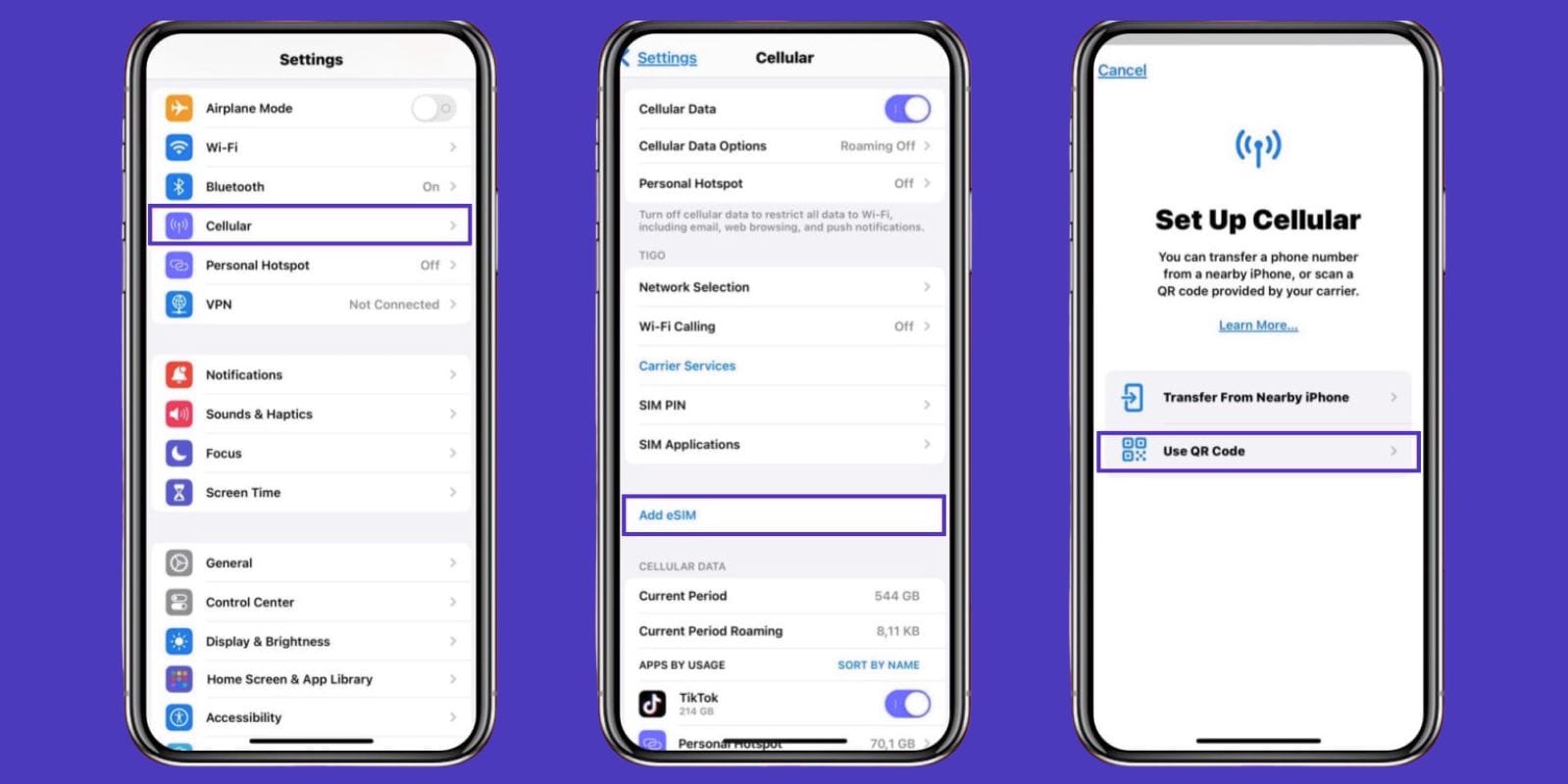
On your iPhone 13, go to Settings > Cellular > Add Cellular Plan or eSIM. This opens your phone’s camera so you can scan the QR code.
Label and activate your plan. Follow the prompts on screen. You can name your plan (e.g., “Travel”) and turn it on.
Before activating your eSIM, ensure your iPhone 13 is connected to a stable Wi-Fi network. Also, make sure to download and save the QR code before you leave home.
Knowing how to activate eSIM on the iPhone 13 is helpful because it gives you the freedom to stay connected anywhere, regardless of which SIM card you're using.
Jetpac: The Best eSIM for Your iPhone 13
After you learn how to activate eSIM on iPhone 13, the next step is choosing a plan. Jetpac is a great option for individuals seeking reliable data while traveling. If you've been asking, does iPhone 13 have eSIM compatibility with various providers? You'll be pleased to know that Jetpac works seamlessly with all iPhone 13 models.
Jetpac offers prepaid plans for over 100 countries. Their eSIMs work perfectly with the iPhone 13, and activation only takes minutes. If you’re using an iPhone 13 eSIM for travel, Jetpac is an easy and affordable choice.
You can pick your plan based on how long you're away or how much data you’ll need. And because iPhone 13 supports eSIM, it’s fully compatible with Jetpac’s system.
Benefits of Using eSIM for iPhone 13
There are many reasons to try eSIM on your iPhone 13, especially if you're traveling or need flexible data. For those who have been researching, does iPhone 13 have eSIM capabilities? Here are some of the benefits you can expect:
Instant Delivery
Once you buy your plan, Jetpac sends your QR code by email right away. It’s ready to scan in seconds.
Reliable U.S. Coverage
Companies like Jetpac use top networks in the U.S., such as Verizon & AT&T, for reliable connections and fast speeds. Your iPhone 13 eSIM gets the same connection quality as locals.
Flexible Data Packages
You can choose daily, weekly, or monthly plans to match your trip. You won’t pay for more than you need.
Hotspot Sharing
You can easily share your eSIM connection with your travel buddies through your iPhone’s hotspot.
24/7 Customer Support
If you need help, Jetpac’s support team is always available to answer any questions or help you with troubleshooting.
Ready to stay connected during your next trip? Explore Jetpac’s affordable eSIM plans and get connected in minutes.
What to Look for While Picking a Travel eSIM Plan
Not all eSIM providers are the same. Here’s what to consider when choosing the right one:
Instant Delivery
Make sure you get your QR code right after paying. You should be able to install your eSIM within minutes.
Good Coverage
Choose providers that use strong local networks in your destination. A plan is only useful if you get a signal.
Short-Term Plans
If you're only traveling for a few days, you don’t need a long-term plan. Look for flexible options.
Hotspot Support
If you want to use your iPhone as a Wi-Fi hotspot, ensure the provider allows it.
Customer Support
Things don’t always go perfectly. It’s helpful to have access to 24/7 support in case you need help while abroad.
Providers like Jetpac are great for all of the above. Their setup is fast, the coverage is good, and the support is easy to reach. For U.S. or international travel, they’re a smart and simple choice.

FAQs: eSIM on iPhone 13
Does iPhone 13 have eSIM?
Yes, every model of the iPhone 13 has eSIM capability.
How many eSIMs can iPhone 13 have?
You can store multiple eSIMs on your phone, up to eight or more. You can keep two active at the same time.
Can I use a physical SIM and eSIM together on iPhone 13?
Yes. The iPhone 13 eSIM system lets you use one physical SIM and two eSIMs if you prefer.
How do I know if my iPhone 13 eSIM is active?
Go to Settings > Cellular. You’ll see your active plans listed there.
Is my iPhone 13 unlocked? Can I use a Jetpac eSIM?
If your iPhone is unlocked, you can use any eSIM provider. If it’s locked to a carrier, you might be limited to that carrier’s plans.
What happens to my eSIM when I change iPhones?
When you upgrade, you can transfer your eSIM from your old iPhone to the new device. You can read the complete guide here.
Why is my iPhone 13 eSIM not working?
Check your Wi-Fi, make sure you scanned the right QR code, and verify your iOS is up to date. You can also remove and re-add the eSIM if needed.
How do I delete an eSIM?
Go to Settings > Cellular, tap on the plan, and select Delete Cellular Plan.