
How Much Mobile Data Do You Really Need for Travel?
Wondering how much mobile data you need for travel? This guide breaks down data usage for maps, TikTok, Instagram, Netflix, and more, and also provides smart tips to save data and avoid roaming fees with Jetpac eSIM.

Wondering how much mobile data you need for travel? This guide breaks down data usage for maps, TikTok, Instagram, Netflix, and more, and also provides smart tips to save data and avoid roaming fees with Jetpac eSIM.
Wondering how much data you need when traveling abroad? This guide will explain how much data you need for different activities and how you can monitor it.
Why Data Matters When You're Abroad
You have WiFi pretty much everywhere, including homes, offices, and coffee shops you often visit. But when you travel? That's a whole different story. The second you step off that plane in another country, you quickly figure out that counting on free Wi-Fi just isn't realistic. You'll need Google Maps so you don't get lost trying to find your hotel, translation apps so you can actually order food without figuring out “what does it mean”, WhatsApp to let everyone know have arrived safely, Instagram and TikTok to share your trip moments, and probably Netflix when you just want to chill after walking around all day. Before you know it, you realize you may need mobile data.
That's where something like a Jetpac eSIM really comes in handy. Rather than stressing about crazy roaming fees or trying to find SIM cards at the airport (which is always a hassle), you can get a Jetpac eSIM and set it up before you even leave home.
Understanding Mobile Data in Simple Terms
Mobile data is basically how your phone connects when there's no Wi-Fi around. Every time you use Google Maps, watch a video, browse Instagram, or look at your emails, you're using your mobile data in the absence of WiFi.
The question that comes to many travelers’ minds is: how much data do I need? More specifically, how much data do you really need when you're somewhere far from home? Understanding your data needs helps you pick the right data plan and travel without any hassle.
Image by Ingo Joseph from Pexels via Canva Pro
How Data Usage Adds Up on a Trip
Let's look at what you'll actually be doing during your trip and how it can consume your mobile data.
Navigating with Google Maps: So, how much data does Google Maps use? Whether you're trying to find some hidden beach or looking for a specific trail or restaurant, every time you load up directions, you're using data.
Browsing the web: Those quick searches for "hidden gems nearby”, or “best coffee spot,” or checking what time that museum closes might seem like a quick search, but they use up your mobile data.
Posting to Instagram or TikTok: If you are someone who likes to share every photo or video on social media like Instagram or TikTok, you would use much of your data.
Streaming music during flights: Streaming music is perfect for killing time during flights or even in trains, but those playlists are quietly eating up your mobile data while they play.
Making video calls home: Just a quick ten-minute FaceTime call with family back home can easily use up hundreds of megabytes.
Working remotely: Basic email stuff doesn't use much data, but hopping on a Zoom call or uploading files to the cloud or Google Drive can use your mobile data quite a lot.
Playing games: You may be able to play some games offline, but if you’re into online games, know that they are going to decrease your mobile data faster than you’d think.
How Much Data Common Travel Activities Use
Here is how much data these activities may consume, so you can figure out which plan you should pick:
|
Travel Activity |
Average Data Usage |
Notes |
|
Navigating with Google Maps |
Around 5 MB per hour |
Very light, even with daily use. |
|
Browsing websites |
Around 18 MB per hour |
Checking schedules, reviews, or news. |
|
Posting to Instagram or TikTok |
20–70 MB per video upload |
The data usage may increase depending on the size of the video. |
|
Streaming music |
30–40 MB per hour |
It can be higher with high-quality audio. |
|
Video calls (Zoom, FaceTime, WhatsApp) |
300–500 MB per hour |
Depends on the video resolution. |
|
Working remotely (emails, docs, basic tasks) |
Around 3 GB per day |
Adds up quickly with cloud or Google Drive uploads. |
|
Streaming Netflix or YouTube |
300 MB–3 GB per hour |
Usage varies by video quality and resolution |
|
iMessage |
<1 MB per 100 texts; 2–5 MB per photo |
Texts take less data, but photos/videos increase usage. |
Understanding these numbers helps you figure out the answer to: How much data do I really need for my specific trip? How much data do Instagram use? Or how much data Netflix uses? Knowing how much data you need beforehand can save you from overpaying.
How to Check Your Current Data Usage
It’s always best to keep track of your mobile data and check how much is left. Here is how you can check your current data usage:
On iPhone: Go to Settings → Mobile Data → Current Period Usage.
On Android: Go to Settings → Network & Internet → Mobile Network → Data Usage.
You can also scroll through the list and see which apps consume the most data. So you can avoid using them on your trip if not necessary.
If you're using Jetpac eSIM, you can track usage in real time and top up on the go through its application.
How Much Data Do Travelers Really Need?
It depends on your usage and how long you are planning to stay in that particular destination. Below is a breakdown of how much data you may need. Remember, it’s just an estimate. You may need more or less depending on your usage.
Weekend city break (2–3 days) → 1–3 GB is usually enough.
One-week holiday → plan for 3–5 GB.
Two-week adventure → 5–10 GB, especially if you're uploading photos or using maps constantly.
One-month digital nomad stay → 15–30 GB, especially if you're working remotely.
In other words, if you're still wondering, "How much data do I really need?" the answer depends on your habits. But for most leisure travelers, 5 GB will get you through comfortably.
Smart Ways to Make Your Data Last Longer Abroad
Want to stretch your gigabytes? With just a bit of preparation, you'll notice your data lasts much longer and you won't have to stress about running out mid-trip. Here are some easy tricks that can really make a difference:
Download offline maps: Google Maps lets you save entire city areas or regions before you travel. Just search for your destination, tap "Download," and you'll have full navigation without using any data. This is especially useful for long walking tours or road trips.
Save playlists and podcasts before your flight: Spotify, Apple Music, and podcast apps all let you download content for offline listening. You can also turn data saver on for these apps if they allow it.
Use Wi-Fi strategically in hotels and cafés: Most hotels offer free Wi-Fi, and many restaurants and cafés do too. Use these opportunities to upload photos, check emails, and do data-heavy tasks instead of burning through your mobile data.
Turn on Low Data Mode on your phone: The low data mode settings reduce background activity and automatic downloads. Your apps will still work, but there'll be less data usage.
This is how you can turn this setting on:
For iPhone: Go to Settings > Cellular > Cellular Data Options > Low Data Mode.
For Android: Go to Settings > Network & Internet or Connections > Data Usage > Data Saver and switch it on.
These settings may vary depending on your phone model.

Image by Jetpac
Stream at lower resolution on Netflix or YouTube: Switching from HD to standard definition can cut your streaming data usage by 60-70%. You can also change the streaming setting to WiFi only, or you can download content to watch later. Many apps, such as Netflix, allow you to download your favorite shows.
Limit background data usage for apps: Many apps refresh content in the background even when you're not using them. Turn this off for apps you don't need constantly updated.
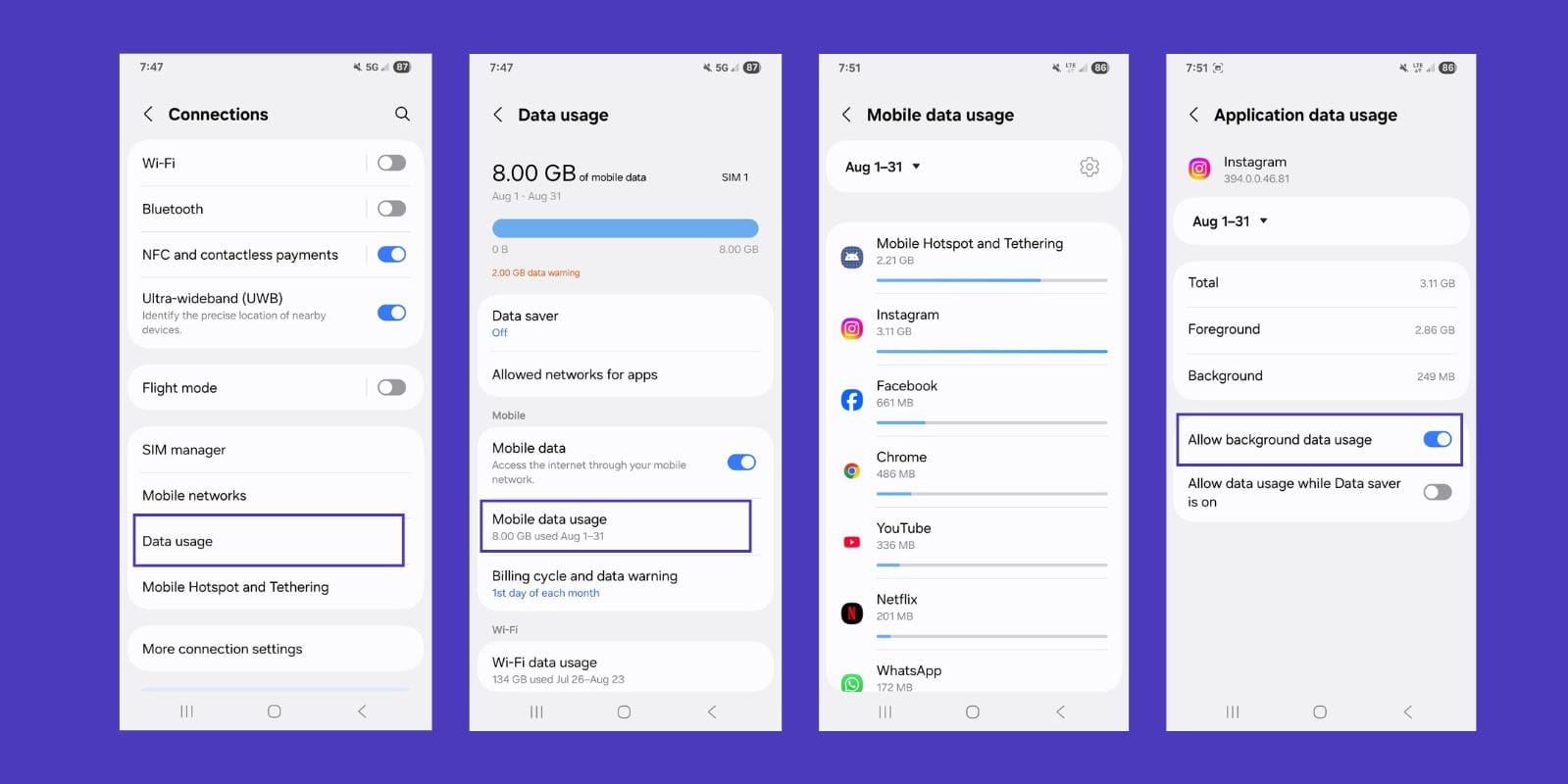
Image by Jetpac
Choosing the Right eSIM Data Plan
Now comes the decision point: how much data do you really need, and what eSIM data plan should you pick? It really depends on what type of traveler you are.
Light traveler (basic maps, messaging, a few posts) → You can go with a smaller data pack. If you're mostly using your phone for essential navigation, staying in touch with family, and posting the occasional photo, 1-3 GB should be sufficient.
Social media lover (Instagram reels, TikTok videos, daily stories) → You may choose a medium pack. If you're documenting every meal, every sunset, and every cute street you walk down and sharing it, you'll want 5-10 GB to avoid any stress.
Remote worker or streamer → If you are a digital nomad or streamer, you should get unlimited data, especially when you're doing video calls, file uploads, or streaming entertainment.
The good thing about Jetpac eSIM for international travel is flexibility. You can choose packs that match your travel style instead of paying for way more (or way less) than you need. Additionally, if you run out of data, you can always top up more data without switching providers or hunting for local SIM cards. Another perk is that you can still use essential apps such as WhatsApp Chat, Google Maps, and Uber even if your data runs out (this offer is only valid on packs of more than 3GB).
Avoiding Roaming Bill Shock
With traditional roaming, 1 GB can easily cost $10–20, depending on your carrier and destination. That means a simple week abroad could hit you with a $200+ bill that shows up on your statement weeks later. Even worse, some carriers charge by the MB, so you could rack up charges without even realizing it.
With Jetpac eSIM, you know exactly what you're paying for from the start. No hidden surprises, no per-MB charges that add up quickly, no bill shock when you get home; just a flat rate for however many GBs you choose. You pay upfront, use what you bought, and that's it. If you need more, you can add it up as per your choice instead of wondering what your final bill might look like.

Image by Maridav via Canva Pro
FAQs
How many GB of data do I need for international travel?
For a one-week holiday, most people need 3–5 GB. For longer stays, plan closer to 10 GB. The key is understanding how much data you need based on your specific travel habits.
Is 1 GB of data enough for a week abroad?
Yes, it should be enough only if you stick to light usage, like a bit of browsing, and use maps occasionally.
How long does 5 GB of data last while traveling?
Typically, it may last 1–2 weeks for a light traveler, depending on usage.
Does 5G use more data than 4G?
Not really. But 5G does load faster than 4G, which may tempt you to prefer it more.
How much data does Google Maps use per hour?
Navigating on Google Maps may take roughly 5 MB per hour.
How much data do streaming apps like Netflix or YouTube use?
Streaming apps like Netflix or YouTube may use 300 MB to 3 GB per hour, depending on video quality. If you’re wondering exactly how much data YouTube uses, at standard resolution, it’s around 500–600 MB per hour, but HD or 4K can use even more data.
How much data do social media apps like Instagram or TikTok use?
A short TikTok or Instagram video upload can easily run 20–70 MB. If you’re curious about how much data TikTok uses, an hour of browsing videos can be around 700 MB. However, on Instagram, feed browsing only takes about 120 MB per hour and up to 600MB for videos.
How much data iMessage uses?
Texts usually take about 1MB, but photos can take 2 to 5 MB.
How can I check my mobile data usage on iPhone or Android?
You can check the mobile data usage on iPhone or Android through settings, or you can use the Jetpac App to track the usage.
How can I reduce mobile data usage while traveling?
There are many ways you can reduce the mobile data usage while traveling, such as downloading offline content, using Wi-Fi when you can, and turning on Low Data Mode.
Is it better to get an unlimited data eSIM for travel?
If you stream, video call, or work remotely, it may be worth getting an unlimited data eSIM. Otherwise, a smaller plan may be enough.
So, are you still wondering “how much data do I need when I travel?” The truth is, how much data do you really need comes down to your habits. For light users, 1–3 GB covers a quick trip. For social media fans, 5–10 GB should be enough. And if you're working remotely while traveling, you should invest in unlimited data.
Rather than worrying or guessing about roaming costs or praying that the airport Wi-Fi actually works when you need it most, just get yourself a Jetpac eSIM before you travel. With data plans suiting all kinds of travelers, transparent pricing, and reliable coverage, you won't find yourself standing in some random plaza at 2 PM frantically wondering "How much data do I really need?" because you'll have already sorted it out.


