Will My Phone Work in Mexico? 6 Tips for Travelers
Find out if your phone will work in Mexico, how to avoid roaming charges, and the easiest way to stay connected with eSIMs, carrier plans, and travel tips.

Find out if your phone will work in Mexico, how to avoid roaming charges, and the easiest way to stay connected with eSIMs, carrier plans, and travel tips.
If you’re planning a trip to Mexico, you’re probably picturing turquoise water in Cancún, the nightlife of Mexico City, or a slow day at a beach town on the Pacific coast. Between planning tours, checking hotel reviews, and picking out restaurants, there’s one detail that many travelers don’t think about: how exactly are you going to stay connected once you land?
It’s a small thing to think about before you leave, but when you’re standing at the airport trying to call your ride or send a message home, it suddenly becomes one of the most important. So the big question many travelers ask is: Will my phone work in Mexico?
The short answer is yes for most modern smartphones. Here’s everything you need to know, plus six essential tips that will help you use your phone smoothly while traveling to Mexico.
Is Your Phone Unlocked and Compatible?
Before you worry about ‘will my phone work in Mexico?’ or ‘can I use my phone in Mexico’ or which plan to buy or which SIM card to use, the first step is making sure your phone is unlocked. If it isn’t, your options shrink dramatically.
What “unlocked” means and how to check
An unlocked phone isn’t connected to a single carrier. You can put in a new SIM card or download an eSIM for Mexico, and it will work right away. A locked phone only works with the carrier you bought it from, unless you request an unlock.
How to check:
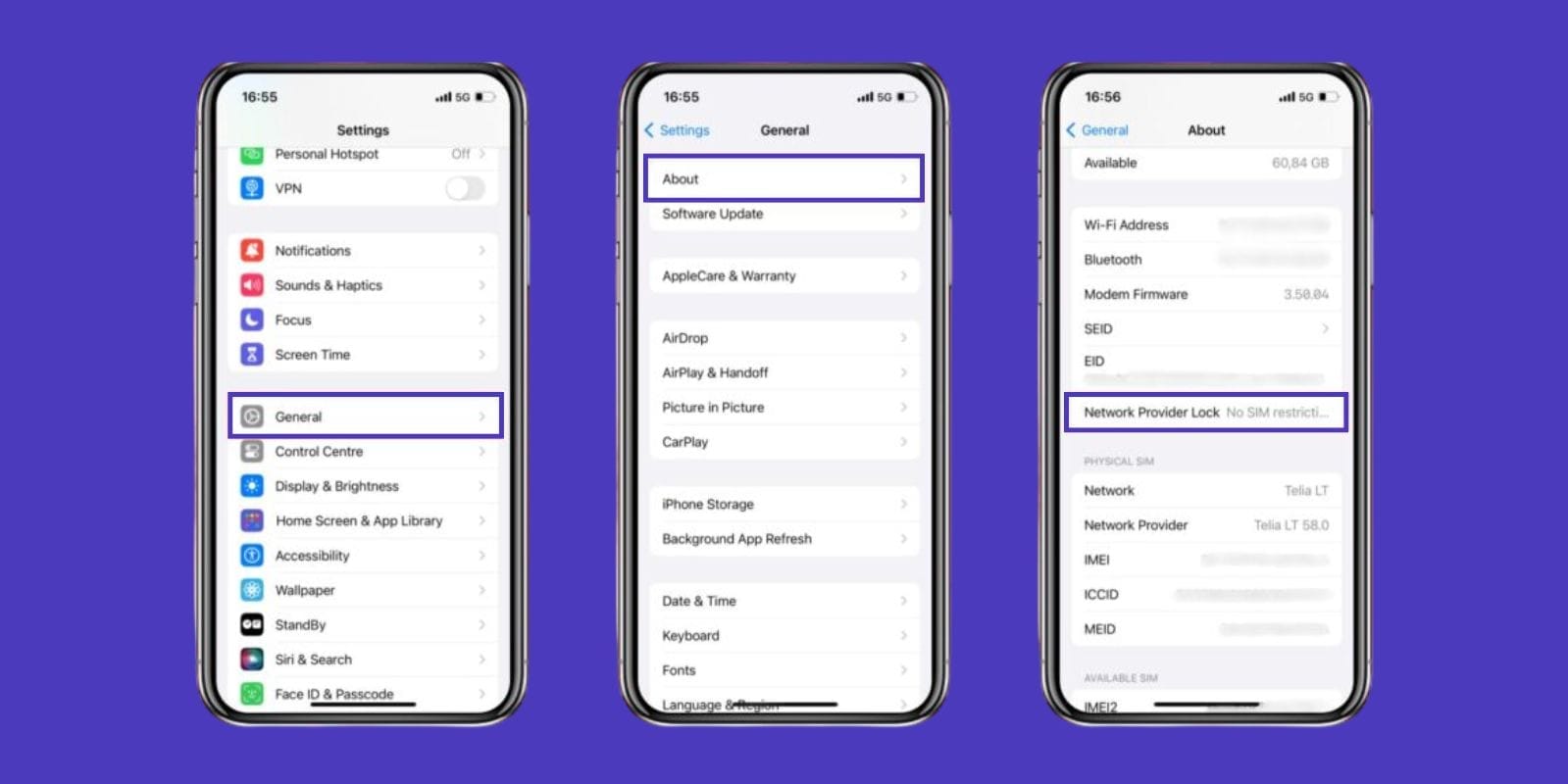
On iPhone: Go to Settings > General > About. Look for Carrier Lock. If it says “No SIM restrictions,” your phone is unlocked.
On Android: The menu varies by brand, but head into Settings > Connections > Mobile Networks. If your phone lets you search and select other carriers, it’s unlocked.
If your phone is locked, don’t wait until the day before your trip to call your carrier, as unlocking can sometimes take several days.
Network bands in Mexico
Mexico runs on GSM networks, with carriers like Telcel, AT&T Mexico, and Movistar. Almost every iPhone and Android released in the last decade supports these bands. But if you still have an older CDMA-only device from Verizon’s early years, it may not connect.
So, to answer the common question “Can I use my phone in Mexico?”. Yes, as long as your phone is both unlocked and compatible with GSM networks.
Will My Carrier Work in Mexico? (U.S. & Canada)
If you’re based in the U.S. or Canada, your carrier probably offers Mexico coverage. The details, however, vary.
AT&T in Mexico: plan inclusions and gotchas
Does AT&T work in Mexico? Yes, and coverage is actually quite good since AT&T owns a Mexican network. Many AT&T unlimited plans already include talk, text, and data in Mexico. The catch is that hotspot usage may be restricted, and data speeds can slow after heavy use.
T-Mobile in Mexico: data speeds and fair-use notes
T-Mobile prides itself on being travel-friendly. Most of their postpaid plans include Mexico. You’ll get unlimited texting and data, but speeds can drop to 2G after using around 5GB. That’s fine for maps and messaging, but not great if you’re streaming or working online.
Verizon in Mexico: TravelPass basics
Verizon uses TravelPass, which lets you use your plan in Mexico for a daily fee (usually around $5 per day). It’s simple since your phone works exactly as it does at home, but it adds up quickly on longer trips.
So yes, your phone will work with all three major U.S. carriers in Mexico, but you’ll want to double-check the fine print on costs and speed caps before relying on it.
Your Connection Options (and When to Choose Each)
Once you arrive in Mexico, you’ve got several ways to connect. The best option depends on how long you’ll be staying and how much you use your phone.
International roaming
The simplest method is international roaming: leave your SIM in, and your carrier connects you to a local Mexican network. The downside is cost. If your plan doesn’t already include Mexico, roaming charges can be high. If you’re asking how to avoid roaming charges, this is the option you may want to avoid.
eSIMs for Mexico
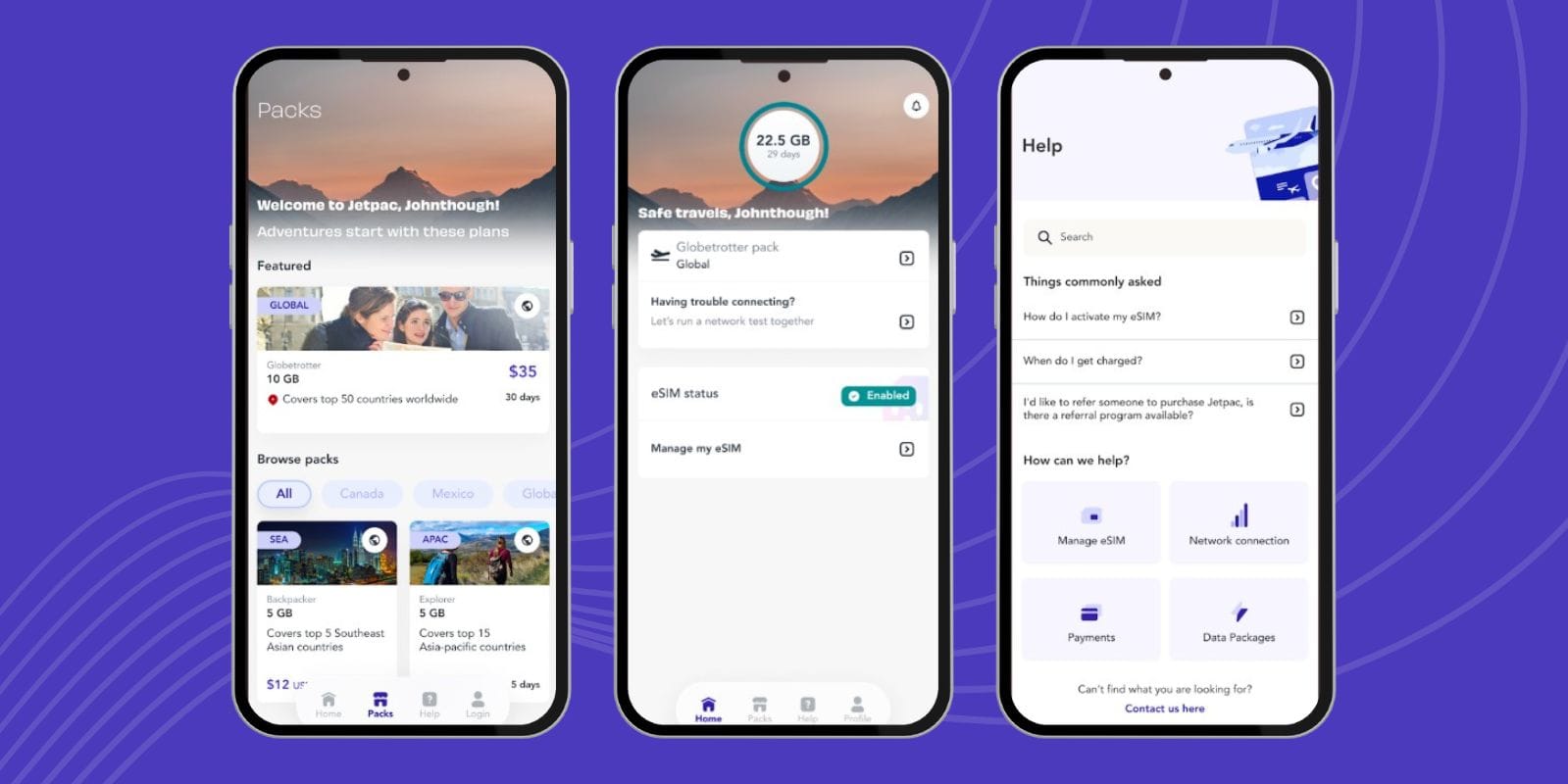
An eSIM for Mexico is a digital SIM card you install by scanning a QR code. You can buy one online before your trip and activate it instantly. The best part is you can keep your regular number for calls and messages while using the eSIM for data.
Many travelers recommend Jetpac because it makes setup painless and offers competitive rates. If you need connectivity the moment you step off the plane, a Mexico eSIM is usually the smoothest choice.
Local prepaid SIM
For longer stays, buying a prepaid SIM from Telcel, AT&T Mexico, or Movistar can be cheaper. You’ll need your phone unlocked and your passport to register in some stores. Plans are often generous with data and sometimes include unlimited social media usage.
Pocket Wi-Fi or pure Wi-Fi strategy
If you’re traveling with family or multiple devices, renting a pocket Wi-Fi hotspot can be handy. On the other hand, if you’re only planning to check emails or maps occasionally, relying on hotel and café Wi-Fi and downloading offline maps may be enough.
Coverage in Mexico: Where Signal Is Strong vs. Spotty
Coverage in Mexico is generally reliable, but it isn’t the same everywhere. Travelers usually have no issues in large cities or popular resorts, while rural areas can be hit or miss. Understanding these differences helps you prepare for the moments when service isn’t guaranteed.
Big cities & resort areas
In major hubs like Mexico City, Cancún, Monterrey, and Guadalajara, coverage is strong with all carriers. Resorts, airports, and tourist zones usually have fast 4G and growing 5G, so using maps, ride-hailing apps, or social media isn’t an issue. If you’re going to stay in big cities or coastal resorts, you can expect reliable service throughout your stay.
Tip: while you’re connected, check out things to do in Mexico City for your itinerary.
Off-grid/rural destinations & backup tips
Once you move into smaller towns, mountain areas, or remote beaches, coverage can drop. Telcel reaches the widest areas, but even it struggles in more isolated spots. To avoid problems, download offline maps, save key details in advance, and use hotel Wi-Fi for heavier tasks.
How to Prepare Your Phone Before Traveling to Mexico
Before you fly, it’s better to get your phone ready so you don’t arrive in Mexico scrambling to connect or stressing about roaming fees. A few simple steps can save you a lot of trouble later:
Unlock your phone if needed. If your carrier still has it locked, you won’t be able to use a local SIM or eSIM. It’s better to check at home and sort it out before the trip.
Buy and install your Mexico eSIM in advance. You can set it up before you fly, and it will connect the moment you land, which saves you time at the airport.
Download offline maps. Google Maps lets you save the places you’ll be visiting, so even if your signal drops, you’ll still know where to go.
Turn on Wi-Fi calling. It’s better to enable it ahead of time so you can make calls over hotel or café Wi-Fi without worrying about roaming charges.
Limit background app data. It’s better to turn off auto-updates and background refresh; otherwise, your phone will eat up data and drain battery faster than you’d like.
A little preparation before you leave means your phone will be ready the moment you land, and you can focus on enjoying Mexico instead of fixing settings.
6 Essential Tips for Travelers Using Their Phone in Mexico
Even if your carrier includes Mexico, small steps before and during your trip can make a big difference in your journey. These tips will help you stay connected without stress, avoid surprise charges, and make sure your phone is ready for long travel days.
Check if your phone is unlocked before you go
It’s better to confirm this at home instead of finding out at the airport when you try to switch SIMs. An unlocked phone gives you the freedom to use an eSIM or buy a local prepaid plan. If you’re not sure, call your carrier a week or two before your trip so you have time to unlock it.
Download maps and key apps for offline use
You can download Google Maps for the cities you’ll be visiting, so if your connection drops, you won’t get lost. Apps like WhatsApp, Uber, and Google Translate are also worth installing ahead of time. It’s better to have them ready before you go rather than trying to download them over slow hotel Wi-Fi.
Turn on Wi-Fi calling to save roaming costs
Wi-Fi calling lets you use your regular number to make and receive calls over the internet. It’s better to enable it before you leave so you can take advantage of free hotel or café Wi-Fi. This way, you can stay in touch with family or work without paying roaming fees.
Use secure Wi-Fi or a VPN when browsing
Public Wi-Fi is everywhere in Mexico, cafés, airports,and hotels, but it isn’t always safe. It’s better to connect through a VPN if you’re logging into accounts or handling money online. If you don’t have one, stick to trusted networks and avoid doing anything sensitive on open Wi-Fi.
Choose an eSIM for instant, reliable connectivity
An eSIM for Mexico is one of the easiest ways to get connected right away. You can buy and install it before you fly, and it will activate the moment you land. Many travelers find Jetpac to be the best eSIM for Mexico because it’s simple, affordable, and lets you keep your home number active.
Carry a portable charger for long travel days
Between taking photos, using maps, and checking social media, your phone battery drains faster than you expect. It’s better to carry a slim power bank so you don’t end up with a dead phone halfway through a day trip. A backup charger means you’ll have navigation, translation, and communication when you need them most.
Buying and Topping Up in Mexico
If you’d rather use a local SIM instead of an eSIM, the process is easy and quick once you know where to look. Prices are usually affordable, especially if you buy a Jetpac eSIM, and you’ll get reliable coverage.
Where to buy
You can find SIM cards at airports, convenience stores like OXXO, large supermarkets, and official carrier shops. Telcel is the most common, but AT&T Mexico and Movistar also have kiosks in many cities. If you want the smoothest experience, it’s better to buy directly from a carrier shop since staff can help with setup.
What you’ll need
In most cases, you’ll just need your phone and a method of payment, but some stores may ask for your passport as ID when registering a new SIM. It’s better to carry it with you just in case. Once you’ve purchased an eSIM, topping up is easy; you can simply do it through the mobile app. Packages often include unlimited social apps like WhatsApp or Facebook, which is a popular perk for locals and travelers alike.
Calling and Texting Basics in Mexico
Phone numbers in Mexico have a simple structure once you get used to them.
Mexico’s country code is +52, and local numbers usually have 10 digits. If you’re calling from abroad, you’ll need to add +52 first. Within Mexico, you just dial the 10-digit number directly.
That said, traditional calling and texting aren’t what most people use. WhatsApp is the go-to tool for almost everything: friends, family, even businesses like restaurants and tour companies. If you’re on an iPhone, iMessage works well too, as long as you have Wi-Fi or mobile data. It’s better to set up WhatsApp before your trip so you’re ready to connect with locals the way they expect.
Safety, Costs, and Etiquette
Using your phone abroad isn’t just about coverage and costs. You should plan to stay safe and be prepared as well. These small details make a difference.
Public Wi-Fi hygiene. It’s better to connect only to trusted networks, like those at your hotel. Avoid logging into banking apps or sensitive accounts unless you’re using a VPN.
Power plugs. Mexico uses the same Type A/B outlets as the U.S. and Canada, so you won’t need to carry an adapter if you’re traveling from North America.
Emergency number. If you ever need help, dial 911. It connects you to police, fire, or ambulance services, just like back home.
Power bank. Long sightseeing days can drain your battery quickly. It’s better to keep a portable charger with you so your phone is ready for maps, translations, and photos throughout the day.
Best eSIM Option for Mexico: Why Travelers Choose Jetpac
When travelers compare options, Jetpac often comes up as the best eSIM for Mexico. It’s easy to install, affordable, and works across multiple countries, which is handy if you’re visiting more than just Mexico on the same trip.
The ability to keep your home number active while using local data makes it especially practical. Imagine landing in Mexico City and having data the moment you turn off airplane mode; that’s the convenience Jetpac provides.
FAQs
How can I tell if my phone will work in Mexico?
If you’re thinking, ‘will my phone work in Mexico?’, you should check two things: whether your phone is unlocked and whether it supports GSM networks. Most modern iPhones and Android devices already do. If your phone is unlocked, you can use a local SIM or install a Mexico eSIM, which means you’ll be able to connect as soon as you arrive.
Can I use my US cell phone in Mexico?
Yes, most U.S. carriers include Mexico in some way. AT&T and T-Mobile usually cover it at no extra charge, while Verizon relies on its TravelPass system. Your phone will connect, but the experience, cost, speed, and data limits depend on your plan. It’s better to check your carrier’s policy before leaving so you don’t run into surprises.
Do I need to do anything with my phone before going to Mexico?
Yes, a little preparation goes a long way. Make sure your phone is unlocked, decide whether you’ll use a local SIM or an eSIM for Mexico, and download offline maps of the places you’ll be visiting. It’s also smart to enable Wi-Fi calling and turn off background data usage before your trip so you don’t waste battery or rack up unnecessary charges.
Can I use my phone in Mexico without extra charges?
You can if your carrier plan already includes Mexico, or if you set up a prepaid option like a local SIM or a Mexico eSIM. If you just rely on roaming without checking your plan first, you may face high fees. To avoid that, it’s better to plan your connection strategy in advance.
Why won’t my iPhone work in Mexico?
If your iPhone doesn’t connect, it’s usually because it’s locked to a carrier or because it’s an older model that doesn’t support Mexico’s network bands. You can check both of these in your phone settings before you travel. Unlocking your device or upgrading to a newer model usually fixes the problem.
How do I avoid roaming charges in Mexico?
If you’re thinking, ‘how to avoid roaming charges,’ the easiest way is to disable roaming in your phone’s settings and use Wi-Fi calling whenever possible. Many travelers also choose an eSIM for Mexico, which gives them local data at an affordable rate, or buy a local prepaid SIM once they arrive. Planning ahead saves you from the shock of an inflated bill when you get home.
What is the cheapest way to use my phone internationally?
For short trips, an eSIM is often the most affordable and convenient option since you can activate it instantly and only pay for the data you need. For longer stays, local prepaid SIM cards may work out cheaper because they often include generous data packages. Choosing between the two depends on how much time you’ll spend in Mexico and how you plan to use your phone.
How to avoid international roaming charges?
It’s better to turn off data roaming in your settings before you even board your flight. From there, you can rely on Wi-Fi, use messaging apps like WhatsApp, or connect with a prepaid plan such as Jetpac’s Mexico eSIM. These options give you full control over your costs and keep you connected without the risk of surprise charges.
So, if you’re still wondering, will my phone work in Mexico? Or can I use my phone in Mexico? In most cases, yes. AT&T and T-Mobile often include Mexico, Verizon charges a daily fee, and prepaid eSIMs give you flexibility and control.
If you prepare before you leave, unlock your phone, set up an eSIM, and download your essentials, you’ll be able to explore Mexico with confidence. Whether you’re checking out Mayan ruins, discovering fun facts about Mexico, or following a Mexico travel guide to hidden gems, you won’t have to worry about staying connected.