How Long Does it Take to Activate eSIM: Full Guide
How long does it take to activate eSIM? Learn typical activation times, why delays happen, how to fix issues, and the best eSIM options for travel.
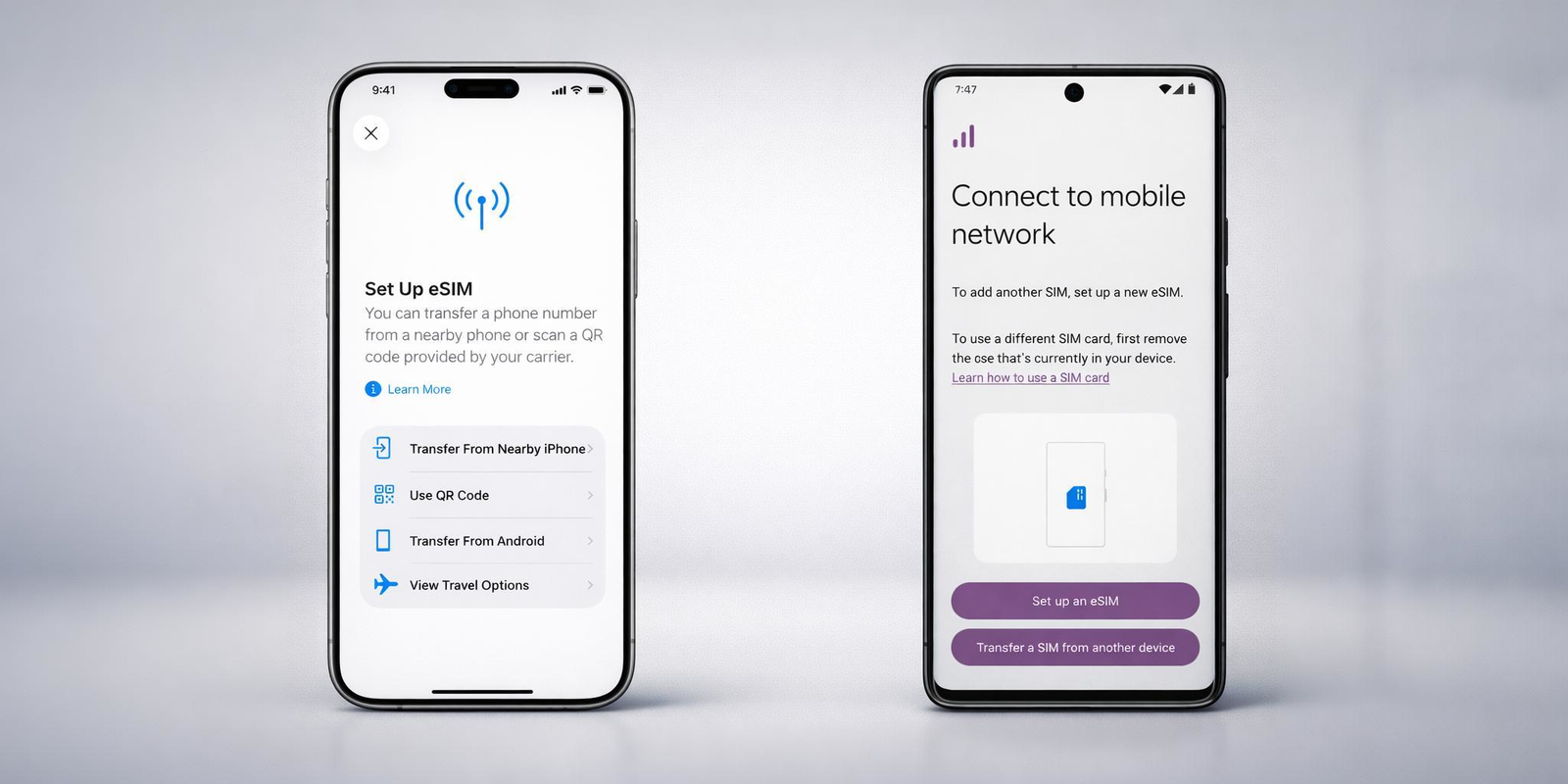
eSIM activation usually takes just a few minutes, but timing can vary based on the device, carrier, and connection quality. Understanding what happens during activation helps you know when a delay is normal and when action is needed. For travel, using an international eSIM keeps the process fast, predictable, and stress-free.
You install an eSIM, the screen shows “Activating,” and the waiting starts. For many people, that moment brings the same question almost immediately “how long does it take to activate eSIM?” and should it already be working by now?
In most cases, eSIM activation is quick. It often takes only a few minutes. But sometimes it takes longer, and when that happens, it can feel confusing, especially if you are setting it up just before a trip or right after landing in a new country. Understanding “how long does eSIM take to activate?” helps you know when to wait, when to check your settings, and when something might actually need fixing.
Activation time can vary based on your device, your carrier, your internet connection, and whether you are using a local plan or an international eSIM like Jetpac. iPhones and Android phones also handle the process a little differently, which affects what you see on screen while it is happening.
This guide explains “how long does it take for eSIM to activate?”, what activation really means behind the scenes, and what to do if your eSIM feels stuck. By the end, you will know what is normal, what is not, and how to get connected with less stress.
What does eSIM activation actually mean?
When you activate an eSIM, your phone is doing more than just turning a switch on. Understanding this makes it easier to judge “how long does it take to activate eSIM?” and whether a short delay is normal.
eSIM activation usually includes three things happening in the background:
✅ First, your phone downloads the eSIM profile. This profile contains the network details your carrier needs to recognize your device. This part depends heavily on having a stable internet connection.
✅ Second, your phone registers that profile with the carrier’s network. This is where the carrier confirms your plan, assigns permissions for data, calls, or both, and links everything to your device.
✅ Third, the network connection is established. Signal bars appear, the carrier name shows up, and mobile data becomes available. Only at this point is the eSIM fully active.
This is why activation is not always instant. Even if the profile downloads quickly, the carrier side may take a little time to complete registration. That delay is often what makes people wonder “how long does it take for eSIM to activate?” or whether something is wrong.
In most cases, all three steps finish within minutes. When they do not, it usually points to a network issue, a carrier delay, or a setup problem rather than a fault with your phone.
Next, let’s look at the short answer most people want first.
Quick Answer: How long does it take to activate eSIM?
For most users, eSIM activation is fast. In normal conditions, it is usually between 1 and 5 minutes. This is true for both iPhone and Android devices when the internet connection is stable and the carrier responds quickly.
In some cases, activation can take a little longer. It is not unusual that it would stretch to 10 or even 15 minutes, especially during busy network hours or when activating a new travel plan.
If the process goes beyond that, people often start asking, “how long does it take for eSIM to activate?” and whether it is stuck. A longer wait does not always mean something is broken, but it is usually a sign that one of the activation steps needs attention.
The sections below explain what to expect on different devices and what to do if your eSIM takes longer than expected.
How long does it take for eSIM to activate on iPhone?
On an iPhone, eSIM activation is usually quick, but the exact timing depends on how the eSIM is being added. Apple supports several activation methods, and each one behaves a little differently.
In most cases, when you activate an eSIM using a QR code or carrier-provided details, “how long does it take for eSIM to activate on iPhone?” is typically 1 to 5 minutes. During this time, the iPhone downloads the eSIM profile, verifies it with the carrier, and completes network registration. Seeing messages like “Activating” or “Waiting for activation” during this stage is normal.
If you are transferring a line from another iPhone using eSIM Quick Transfer or activating an eSIM that was preassigned by your carrier, the process may take longer. In these cases, “how long does it take for eSIM to activate the iPhone?” can extend to 10 or even 15 minutes, depending on carrier approval and account verification.
Activation can also take longer when transferring a number from a non-Apple device or when the carrier needs to complete additional checks. A longer wait does not always mean something is wrong.
If the status does not change after an extended period, the eSIM may appear stuck on activating, which usually points to a carrier-side delay rather than a problem with the iPhone itself. The next sections explain how to confirm activation and what to do if it does not complete.
How long does it take for eSIM to activate on Android?
On Android devices, activation time varies more than it does on iPhones. This is mainly because Android phones differ by brand, model, carrier setup, and region. Because of this variation, “how long does it take for eSIM to activate?” on Android does not have a single fixed answer.
In general, most Android phones complete activation within a few minutes, similar to iPhones, when the eSIM profile downloads correctly, and the carrier responds quickly. However, some Android devices may appear to pause longer at the “activating” stage, even though the process is still running in the background.
When users experience delays, it is usually related to carrier provisioning or device-specific behavior rather than the Android system itself. This is why Android activation sometimes feels less predictable, even though the result is the same.
If the activation screen does not change for an extended period, it often leads to the common concern of an eSIM stuck on activating, which the next section addresses directly.
Why is your eSIM stuck on “Activating”?
When an eSIM remains on “Activating” longer than expected, it usually means one step in the activation process has not finished yet. In most cases, the phone hardware and the eSIM itself are working correctly. The delay happens because the final network registration has not been completed.
Here are the most common and technically accurate reasons an eSIM is stuck on activating:
Carrier provisioning delay
After the eSIM profile is downloaded, the carrier still needs to register the plan on its network. This step happens on the carrier side and can take longer during peak hours, maintenance windows, or system delays.
Unstable internet during setup
eSIM activation requires a stable internet connection from start to finish. If WiFi or mobile data drops, switches networks, or becomes unstable during setup, the activation may pause without showing an error.
QR code reuse or expiration
Many eSIM QR codes are single-use. If a code is scanned more than once or after it expires, the activation may stall instead of completing or failing clearly.
Carrier lock or regional restrictions
If the device is carrier locked or if the phone model comes from a region where eSIM support is restricted, activation can remain stuck rather than showing an immediate error.
Pending system refresh
On phones with multiple stored eSIM profiles, the system may take longer to finalize activation. This usually resolves on its own once the device refreshes network settings.
In most situations, an eSIM that appears stuck is not permanently blocked. It is waiting for the final network confirmation. Knowing this helps you decide whether to wait a bit longer or move on to basic troubleshooting.
How do I know if my eSIM is activated?
Once activation is complete, your phone will display clear signs that everything is working properly. Knowing these signs helps you avoid guessing and answers the common question, “how do I know if my eSIM is activated?”
✅ You see a network signal
Signal bars appear at the top of your screen, and the carrier name becomes visible. This typically indicates that the eSIM has completed registration with the network.
✅ Mobile data works
You can load a webpage, open a map, or use an app that requires the internet. If data works without WiFi, the eSIM is active.
✅ The eSIM shows as active in settings
In your SIM or cellular settings, the eSIM status changes to On or Active. Phones with multiple profiles will also show which line is currently in use.
✅ Calls or texts work if included
If your plan includes voice or messaging, making a call or sending a text confirms full activation.
✅ If all of these are true, your eSIM is active even if the activation screen briefly stayed on “Activating.”
❌ If none of these appear, the eSIM has not completed setup yet.
What to do if eSIM activation takes too long
If your eSIM has been activating longer than expected, it does not always mean something is broken. In many cases, a few simple checks help the process complete or reveal what needs attention.
⏸️ Wait a little longer
Some carriers take extra time to finish network registration. If activation has been running for under 15 minutes, waiting a bit longer is often the right move.
♽ Refresh the network
Turning Airplane Mode on and off forces the phone to recheck network availability. This can prompt the activation to finish.
✅ Restart your device
A restart refreshes network services and clears temporary system delays that can block activation from completing.
✅ Check which line is selected
Phones with more than one SIM or eSIM profile may default to the wrong line. Make sure the newly added eSIM is selected for mobile data.
✅ Confirm your device is unlocked
Carrier-locked devices may download the profile but fail to activate it. Checking the lock status avoids unnecessary retries.
❌ Avoid reinstalling too quickly
Deleting and reinstalling an eSIM too soon can cause further delays, especially if the QR code is single-use. Only reinstall if the carrier confirms it is safe to do so.
If none of these steps help, the issue is usually on the carrier side. At that point, contacting the eSIM provider is the fastest way to resolve the delay.
When should you activate an eSIM for travel?
The best time to activate an eSIM depends on how and where you plan to use it. For most travelers, activating earlier rather than later avoids stress and connectivity gaps.
If you are using an international eSIM, installing it before your trip is usually the safest option. You can complete the setup while connected to stable WiFi at home and confirm that the profile is ready. The eSIM may stay inactive until you arrive, then connect automatically once it detects a supported network.
Activating only after landing can work, but it often means relying on airport WiFi or searching for a connection at a busy moment. This is when people start asking, “how long does it take to activate eSIM?” under pressure, especially if they need maps or ride apps right away.
For short trips, activating the eSIM a day or two before departure gives you time to confirm everything works. For longer trips or multi-country travel, early activation helps you avoid delays when switching regions.
In simple terms, activating ahead of time reduces uncertainty and gives you a smoother start to your journey.
How long does it take to activate eSIM for travel?
When it comes to travel, eSIM activation usually feels faster than people expect. In most cases, “how long does it take to activate eSIM for travel?” is just a few minutes, especially if the plan is installed before you leave.
For travel eSIMs, there are two separate moments to understand:
👉 Installation time
This is when the eSIM profile is downloaded to your phone. It usually takes 1 to 5 minutes while connected to WiFi.
👉 Network connection time
This happens when you arrive in the destination country. Once your phone detects a supported network, the eSIM connects automatically, often within seconds.
Because of this split process, many travelers feel that travel eSIMs activate instantly on arrival. In reality, the setup was already done earlier, which is why it feels seamless.
This is one of the main reasons people prefer an international eSIM over roaming or local SIM cards. There is no waiting in lines, no paperwork, and no risk of long delays while you are on the move.
When travelers ask, “how long does it take to activate eSIM?”, the travel answer is usually reassuring: if installed ahead of time, activation is quick and predictable.
Best eSIM for international travel
When timing matters, the quality of the eSIM provider becomes important. A fast activation process only works well if the network behind it is reliable. This is why many travelers choose a dedicated international eSIM instead of relying on roaming or local SIM cards.
Jetpac is one option that works especially well for travelers who want predictable activation and stable coverage across countries.
Here is what makes Jetpac a strong choice for international travel:
1️⃣ Essential apps remain FREE to use, even if your data runs out
WhatsApp chat, Google Maps, Grab, and Uber continue to work, which helps during navigation or quick communication.
2️⃣ In-app calling is available in more than 50 countries
You can call hotels, local services, landlines, or non-WhatsApp numbers directly through Jetpac without needing a physical SIM.
3️⃣ Unlimited hotspot sharing
You can share your connection with a laptop or another device without restrictions.
4️⃣ Clear prepaid pricing
There are no roaming surprises. Everything is paid up front, so you know what to expect.
5️⃣ One eSIM that works in more than 200 destinations
This is useful if your trip includes multiple countries or regions.
6️⃣ Automatic network selection
Jetpac connects to the strongest available local network, which helps reduce connection delays.
7️⃣ Fast 4G and 5G speeds where available
Maps, messaging, and travel apps load smoothly when supported by local networks.
8️⃣ 100% refund option
If the service does not work as expected, Jetpac offers a straightforward money-back process.
9️⃣ 24/7 support is available
Assistance is available through WhatsApp and email, which helps when traveling across time zones.
For travelers who want to avoid waiting, roaming confusion, or activation uncertainty, Jetpac keeps the experience simple and consistent. This makes it a practical option when choosing the best eSIM for international travel.
FAQs
How long does it take to activate eSIM?
In most cases, eSIM activation takes 1 to 5 minutes. Depending on the carrier, device, and activation method, it can sometimes take up to 10 or 15 minutes. Longer delays usually point to a carrier-side issue rather than a problem with your phone.
How long does eSIM take to activate on iPhone?
On iPhone, activation time depends on how the eSIM is added. QR code-based activation is usually quick and completes within a few minutes. Transfers from another iPhone or carrier-assigned eSIMs can take longer because they require carrier approval.
How long does it take for eSIM to activate on Android?
Android activation time varies by brand, model, and carrier. Many Android phones activate within minutes, but some may take longer due to carrier provisioning or device-specific behavior. Android version alone does not determine activation speed.
Why is my eSIM stuck on activating?
If your eSIM stays on “Activating,” it usually means the carrier has not finished registering the plan. Common causes include carrier delays, unstable internet during setup, expired QR codes, device lock restrictions, or regional limitations.
How do I know if my eSIM is activated?
Your eSIM is active when you see signal bars, a carrier name, and working mobile data. In your cellular or SIM settings, the eSIM will show as turned on or active. If calls or texts are included in your plan, those should also work.
What does eSIM do?
eSIM connects your phone to a mobile network without a physical SIM card. It handles mobile data, calls, and texts the same way a traditional SIM does, but everything is managed digitally.
Do I need WiFi to activate an eSIM?
Yes. You need a stable internet connection to download and activate an eSIM profile. This can be a WiFi or another active mobile data connection during setup.
Can I activate an eSIM myself?
Yes. Most eSIMs can be activated by scanning a QR code, using a carrier app, or entering details manually. You usually do not need to visit a store unless the carrier requires in-person verification.
Can eSIM activation take longer than expected?
Yes. Activation can take longer during peak network hours, carrier maintenance, or when transferring a number between devices. A longer wait does not always indicate a failure.
Is eSIM activation safe?
Yes. eSIM activation is a secure process handled through encrypted carrier systems. It does not expose your phone to additional risk compared to a physical SIM.
Disclaimer
Activation times and behavior described in this blog are based on publicly available information and common user experiences. Actual activation speed may vary by device model, carrier, region, and network conditions. This content is for educational purposes only. Jetpac is not responsible for changes in carrier systems, network performance, or device software behavior.