iPhone 16 eSIM: Full Compatibility, Setup Guide Best Plans
Does iPhone 16 come with eSIM capability? Discover everything you need to know in this guide: setup, dual eSIM features, best plans, and Jetpac for travel.
Does iPhone 16 come with eSIM capability? Discover everything you need to know in this guide: setup, dual eSIM features, best plans, and Jetpac for travel.
If you just bought the newest iPhone, you might be wondering: “Does the iPhone 16 support eSIM, and how do I set it up?” The short answer is yes. The entire iPhone 16 lineup comes with full eSIM features, and Apple has made them even easier to use compared to older models.
With the new updates, you get more global carrier options, faster setup, and the ability to keep several eSIMs on your phone. This guide will explain everything you need to know about iPhone 16 eSIM compatibility, iPhone 16 Pro Max eSIM support, setup steps, the best eSIM plans, and how Jetpac can help you stay connected during your trip abroad.
iPhone 16 eSIM Compatibility Explained
The iPhone 16 eSIM is compatible with all models: iPhone 16, iPhone 16 Plus, iPhone 16 Pro, and iPhone 16 Pro Max. Every version is built to support eSIM efficiently.
In the United States, is iPhone 16 eSIM only? Yes. U.S. models do not have a physical SIM slot at all. You’ll need to use eSIM for every carrier connection. In other countries, some iPhones may still come with a SIM tray, but eSIM support is always available.
Apple now allows users to store 8 or more eSIM profiles on a single iPhone. You can also have two eSIMs active at the same time. That means you can use your personal plan and a travel plan together without physically swapping SIM cards.
This iPhone 16 eSIM support makes the phone flexible for both everyday users and frequent travelers.
iPhone 16 vs. Previous Models (What’s New with eSIM?)
Apple has been improving eSIM technology with each iPhone release. Here is a quick comparison of the iPhone 16 eSIM support versus previous models.
|
Feature |
iPhone 13 |
iPhone 14 |
iPhone 15 |
iPhone 16 |
|
eSIM Support |
Yes, but limited |
Wider support |
Dual active eSIM |
Dual active eSIM with smoother setup |
|
Dual eSIM |
One physical + two eSIMs |
eSIM-only in U.S. |
Dual active eSIM |
Improved dual active eSIM |
|
Carrier Activation |
Mostly manual |
Faster QR activation |
Quick app activation |
Instant activation |
|
Global Coverage |
Limited |
Expanded |
200+ carriers |
Wordwide |
|
Security |
Standard |
Better authentication |
Stronger provisioning |
Strongest security + remote setup |
The big upgrades with iPhone 16 eSIM support are:
Dual eSIM improvements: The iPhone 16 smoothly handles two active eSIMs without slowing down. This is perfect if you use one for work and one for travel.
Faster carrier activation: Adding an eSIM is fast and simple. Most carriers now support one-tap setup, so you don’t always need to scan a QR code.
Expanded global carrier support: More carriers worldwide now offer eSIM for iPhone 16, so you can stay connected almost anywhere.
Improved security: eSIMs are linked directly to your device and carrier account. This makes them harder to clone or steal, giving you extra peace of mind.
Remote provisioning: Carriers can push eSIM details to your phone without mailing a SIM card, saving time and effort.
These upgrades make the iPhone 16 eSIM one of the most travel-friendly and secure options Apple has ever offered.
iPhone 16 eSIM Advantages You Should Know
Here are the biggest benefits of using an iPhone 16 eSIM:
No physical SIM tray hassle: You don’t need to carry tiny SIM cards or use a pin to swap them out. In the U.S., every iPhone 16 is eSIM only, so everything is digital.
Instant activation while traveling: You can buy a travel eSIM online and activate it within minutes without any hassle.
Flexibility to switch between multiple networks: How many eSIMs can iPhone 16 have? The answer is eight or more stored, with two active eSIMs at the same time. Switching eSIMs is far easier than managing multiple SIM cards.
Secure and tamper-proof (vs. traditional SIM): Unlike a physical SIM card, an eSIM cannot be removed if your phone is lost or stolen.
Saves space for design: Removing the SIM tray frees up space inside the phone. Apple uses this space for a bigger battery and a slimmer design.
Overall, iPhone 16 eSIM support provides speed, safety, and convenience, allowing you to travel without any issues.
iPhone 16 Physical SIM Card Advantages You Should Know
In some regions, a physical SIM may still be the only option. For example, iPhone 16 models sold in China do not support eSIM. If you buy your iPhone 16 there, you’ll need to rely only on physical SIM cards.
Some advantages of physical SIM include:
Easy to transfer between devices without a digital setup. It’s suitable for those who don’t want to deal with the digital eSIM process.
A physical SIM card may be a better option in places where eSIM isn’t widely supported.
However, outside of China, most people will find eSIM more flexible.
Step-by-Step Setup Guide: How to Activate eSIM on iPhone 16
If you’re wondering how to activate eSIM on iPhone 16, here are two ways:
Option 1: QR Code Setup
Buy an eSIM plan online.
Get a QR code by email.
Open Settings > Cellular > Add eSIM.
Use the camera to scan the QR code.
Follow the on-screen steps to complete setup.
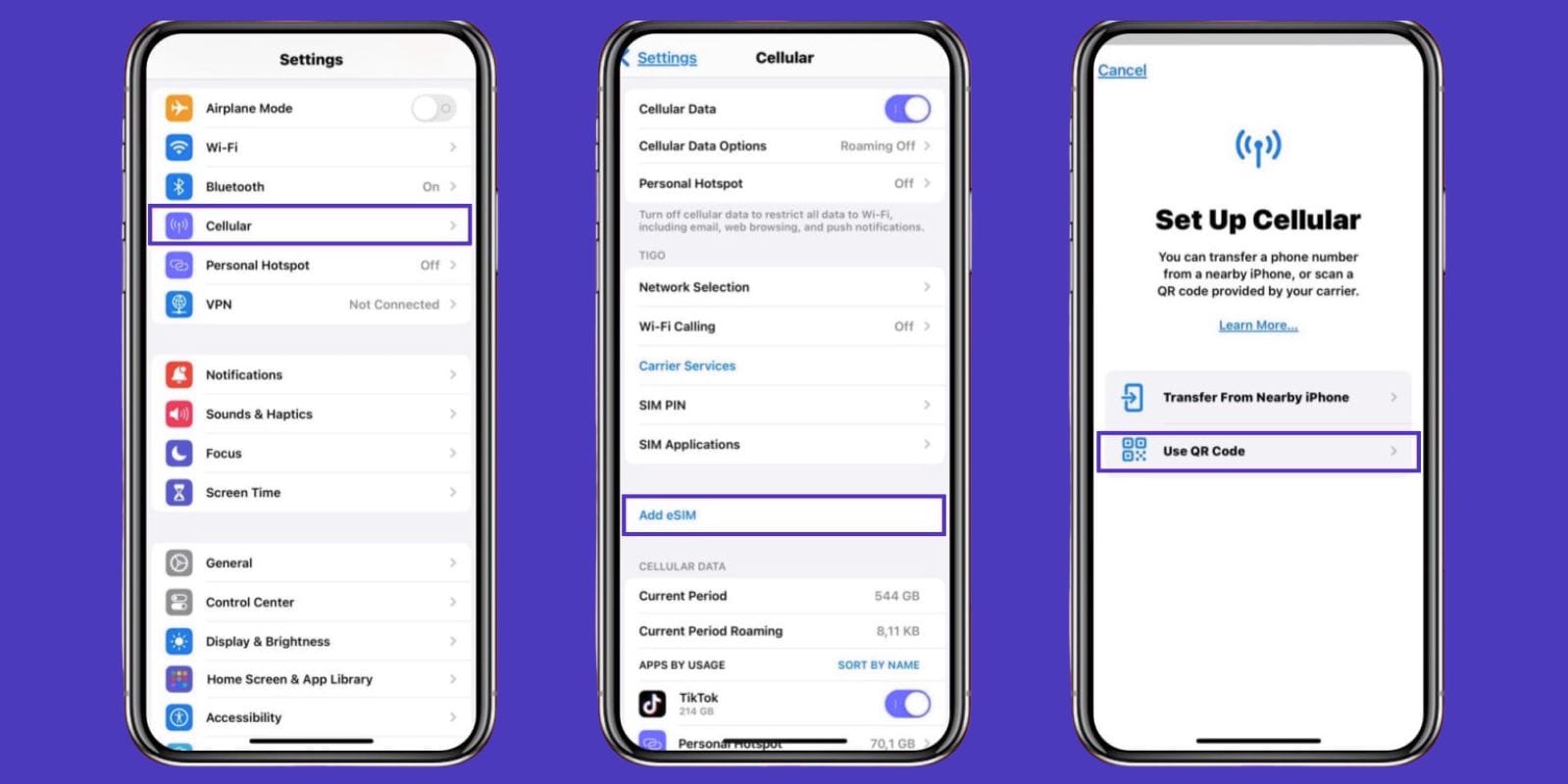
Option 2: Carrier App Setup
Download your carrier’s or eSIM provider’s app.
Pick your plan and tap to install.
Confirm in Settings > Cellular.
Before you begin the eSIM activation process, ensure you have a stable Wi-Fi connection. Do your installation process before leaving for your trip.
Additionally, label each eSIM (such as “Home” and “Travel”) for easy switching.
Best eSIM Plans for iPhone 16 Users
When choosing an eSIM plan for your iPhone 16, keep these factors in mind:
Global Coverage
Pick a provider that works in multiple countries. This way, you won’t have to buy a new SIM for every trip.
Instant Delivery
The best providers send a QR code right after purchase. You’ll be online in minutes.
Flexible Data Packages
Choose between daily, weekly, or monthly plans. It’s cheaper and more flexible than paying for what you don’t need.
Hotspot Support
Make sure your plan allows tethering so you can share data with your laptop or other devices.
24/7 Customer Support
Look for providers that offer help around the clock in case something goes wrong.
Jetpac is one of the best eSIM choices for travelers. The plans are affordable, with prices starting as low as $1. For iPhone 16 users, especially, Jetpac is one of the best travel solutions as it provides reliable coverage in over 100 countries.
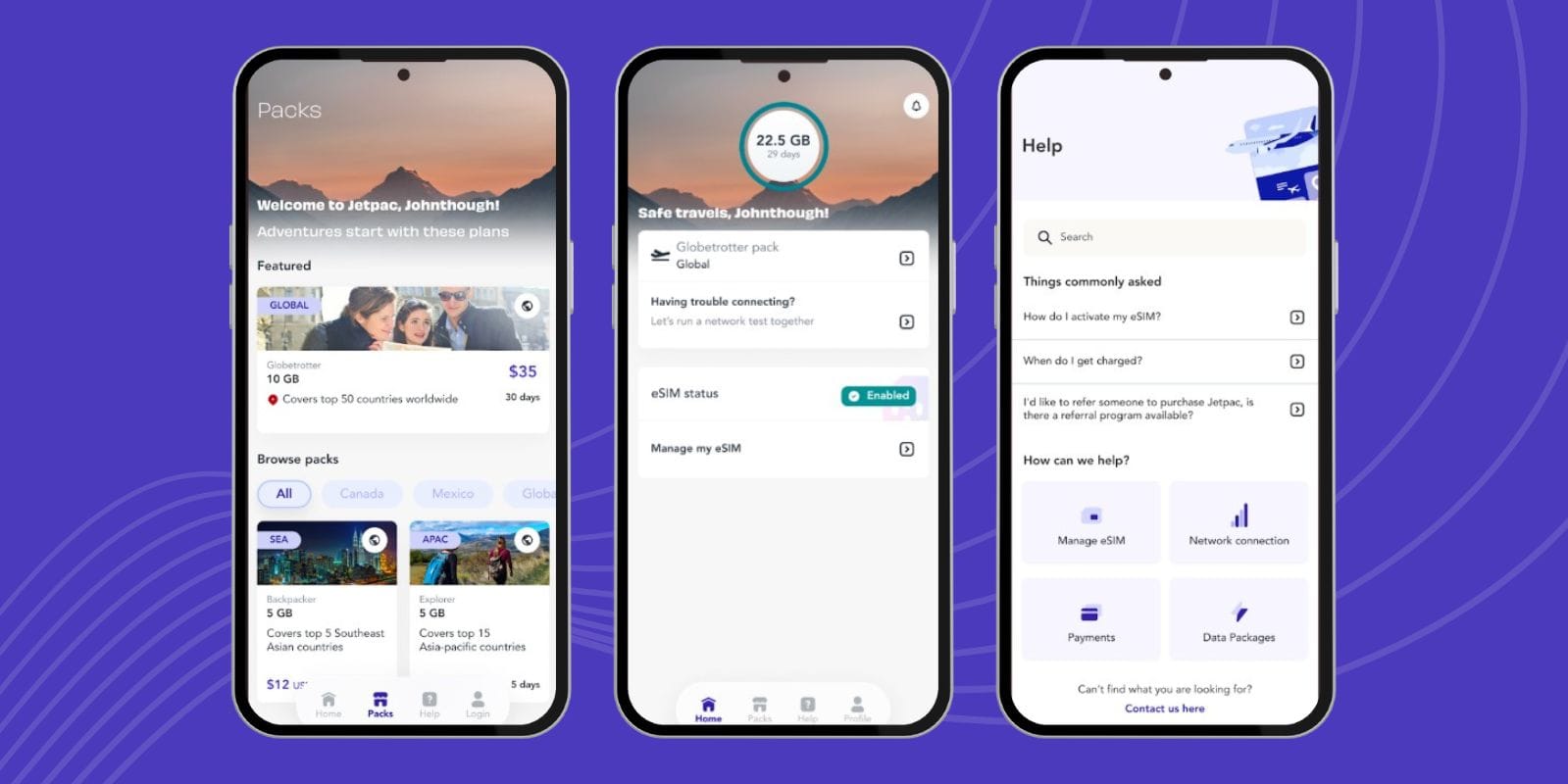
Travel eSIM Buying Guide: Jetpac
When looking for a travel eSIM for your iPhone 16, Jetpac provides several benefits:
Coverage in Your Destination
Jetpac connects with top local carriers, ensuring you always have a strong signal abroad.
Flexible Data Options
From 1-day to 30-day plans, Jetpac offers choices that suit both short trips and long stays.
Local Network Partnerships
Jetpac offers multi-network coverage, which means faster speeds and fewer dropped signals.
Customer Support Availability
Traveling can be stressful, and with eSIM, it’s essential to have 24/7 support, which Jetpac provides. No matter when or what help you need, Jetpac is always there to assist you.
Hotspot Sharing Capability
Most Jetpac plans allow you to use a hotspot, enabling you to connect your laptop or share data with family.
With these features, Jetpac stands out as one of the best travel eSIM providers for iPhone 16 eSIM support.
How to Set Up an eSIM on iPhone 16 Using the Jetpac App
Here’s how you can set up an eSIM on iPhone 16 using the Jetpac App:
Download the Jetpac App from the App Store.
Connect to Wi-Fi before installation.
Open the app and browse plans for your travel destination.
Purchase the plan safely inside the app.
Tap “Install eSIM” and follow the instructions.
Go to Settings > Cellular to confirm installation.
Label your eSIM (like “Jetpac” or “Travel”).
Activate before your trip or when you land.
This makes Jetpac one of the easiest providers for eSIMs. If you are still wondering, “How many eSIMs can be used in iPhone 16?”, you can use one physical and two active eSIMs. With just a few taps, it’s ready to go anywhere.
The iPhone 16 eSIM makes mobile service simpler than ever. With easy setup, multiple profiles, and worldwide coverage, it’s designed for both daily use and international travel.
Pairing your phone with Jetpac gives you instant, low-cost data in over 100 countries.
Ready to stay connected anywhere? Explore Jetpac’s prepaid eSIM plans and get online in minutes.
FAQs About iPhone 16 eSIM
Does the iPhone 16 have eSIM?
Yes, all iPhone 16 models include eSIM, and in the U.S., iPhone 16 models only support eSIM.
Can I use two eSIMs at once?
Yes. The iPhone 16 supports dual active eSIMs.
Can I still use a physical SIM with iPhone 16?
It depends. In the U.S., iPhone 16 is eSIM only. In China, only a physical SIM works.
How many eSIMs can iPhone 16 have?
You can store eight or more eSIMs, but can only keep two eSIMs active at a time.
How many eSIM can be used in iPhone 16 at once?
You can have two active while keeping others stored.
What happens if I change iPhones?
You can transfer your eSIM easily from your old device to your new iPhone.
Why isn’t my eSIM working?
Check your Wi-Fi connection, restart your phone, or confirm your carrier supports eSIM.
How do I delete an eSIM?
Go to Settings > Cellular > eSIM and select the one to remove.